
This RoboNix Service is provided and maintained by Prof. Xiang Chen's group (IFLab), School of Computer Science, Peking University.
RoboNix Navigation Computing Optimization
An open-source navigation computing optimization toolkit for RoboNix dual-system VLN
简体中文 · What this adds · 🎬 Demo Video · 🏆 Benchmark Results · Demo filming · Quick Start


🎯 What this adds to RoboNix
This repository turns a dual-system VLN S1/S2 inference path into a deployable, callable, and observable RoboNix cloud–edge navigation service. S1 keeps the edge action loop moving while S2 refreshes high-level semantic context in the cloud; this repository owns when they communicate, how model history advances correctly, how timeouts and late results are handled, and how the runtime binds to RoboNix lifecycle and robot I/O.
| RoboNix gets | Detail |
|---|---|
| A genuinely split cloud–edge runtime | Heavy S2 runs on a cloud GPU and lightweight S1 runs at the edge; the edge never has to materialize the complete dual-system model. |
| Adaptive collaboration without blocking control | Key-latent synchronization, active/pending buffers, adaptive timeouts, and late-response absorption let S1 keep moving without consuming stale context indefinitely. |
| Preserved closed-loop model semantics | One action is executed per observation while short-trajectory tails are retained; edge-only frames are replayed into S2 history, and S2 LOOK_DOWN / STOP actions are handled correctly. |
| A complete RoboNix Service surface | Four MCP tools — navigate, navigate/status, navigate/cancel, telemetry — plus standard camera, pose, and chassis contracts, with no RoboNix-core patch. |
| Measured system gains | Edge model memory is about 0.60 GB versus 16.63 GB for Edge Only. On Orin+A100 the control loop is 2.22× faster at nearly the same SR, while recovering +6.1 SR / +12.7 SPL over Naive ECC. |
The concrete S1/S2 model and weights are InternVLA-N1; the rest of this document focuses on this repository's cloud–edge deployment, runtime correctness, scheduling, and RoboNix integration.
The catalog identity is robonix.service.navigation.computing_optimization because the external
RoboNix boundary is a long-running navigation service; cloud–edge compute
optimization is its core implementation. Cloud S2 belongs to the same runtime
on a GPU host outside the robot deployment. An HTTP lifecycle API remains for
non-RoboNix orchestrators. See
RoboNix Integration Boundary.
🎬 Demo Video
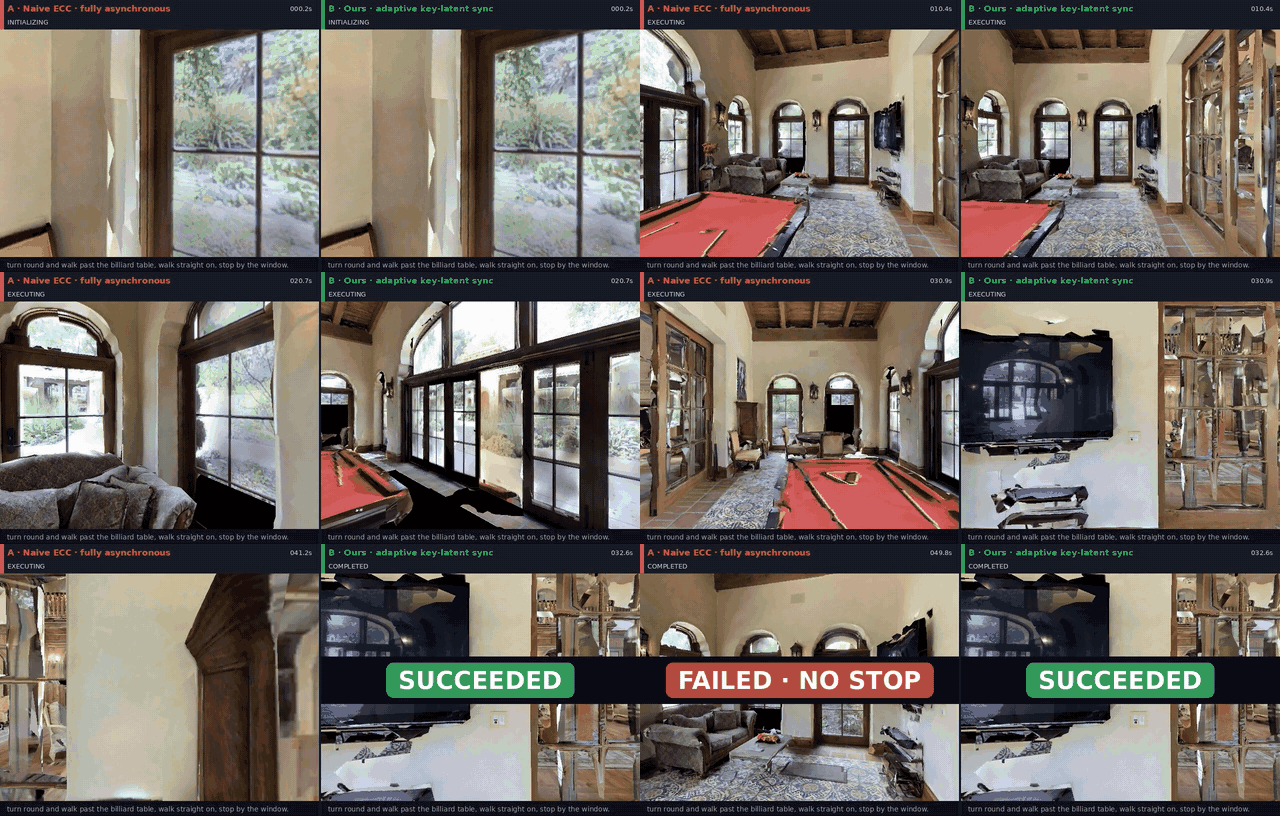
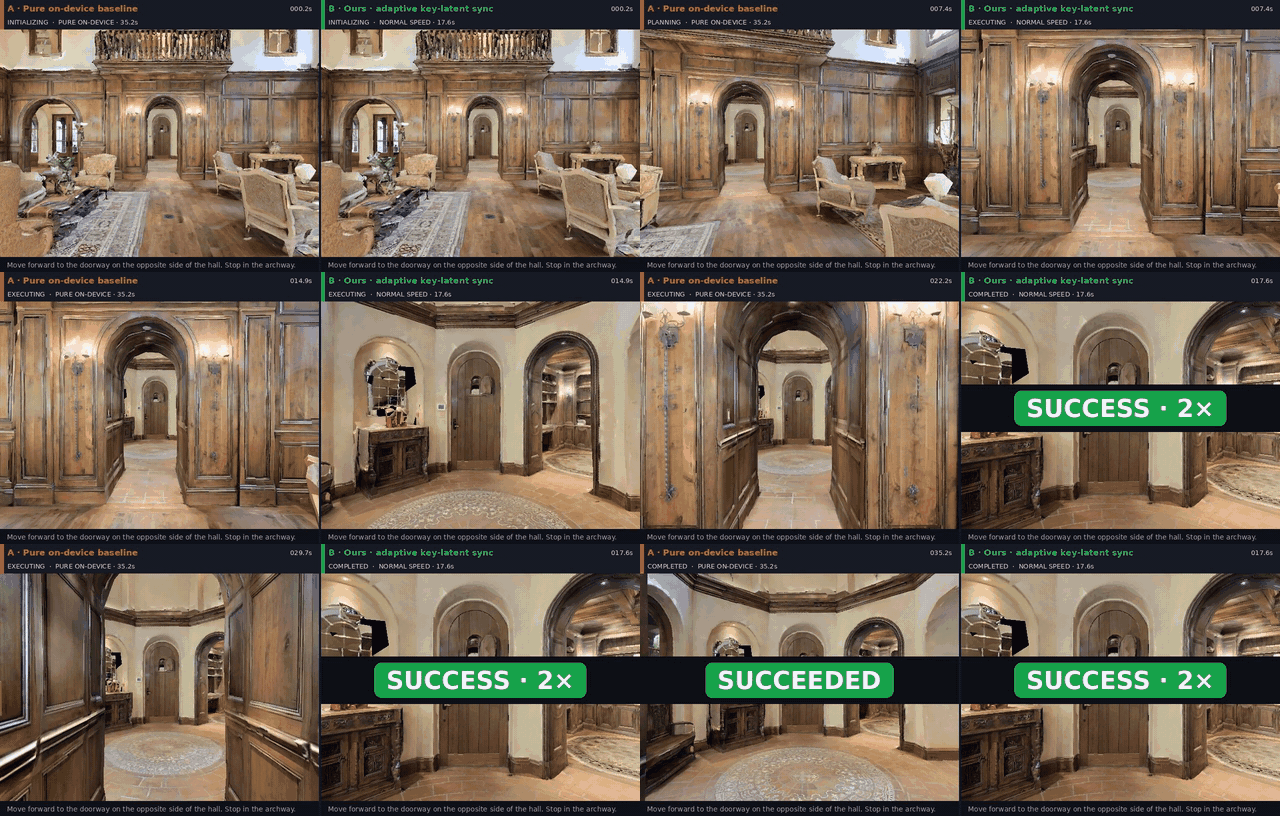
These recordings run the trained InternVLA-N1 policy through the RoboNix Service control path in Habitat / R2R-CE. They are real-policy simulation demos, not physical-robot validation. The two representative reels cover robustness and actual task completion time without a redundant grid or single-lane clip.
1 · Robustness: Naive ECC times out, Ours succeeds
2 · Completion time: Edge Only and Ours succeed, Ours is about 2× faster
The complete RoboNix TUI sequence — startup, instruction entry, tool invocation, and terminal state — appears under RoboNix Integration Boundary instead of being duplicated here.
⚡ Results
| System-level result | Current value | Structured source |
|---|---|---|
| Main benchmark | R2R-CE val-unseen, 1,839 episodes |
benchmarks/r2r_ce/metadata.yaml |
| Orin+A100 step latency | 2.22× faster than Edge Only, 497.8 → 224.4 ms |
benchmarks/r2r_ce/results/main_results.csv |
| Quality recovery over Naive ECC | +6.1 SR, +12.7 SPL | benchmarks/r2r_ce/results/main_results.csv |
| Edge model memory | 0.60 GB, versus 16.63 GB for Edge Only | benchmarks/r2r_ce/results/main_results.csv |
| Runtime control state | < 8 KB for pending latent and counters | benchmarks/r2r_ce/results/runtime_overhead.csv |
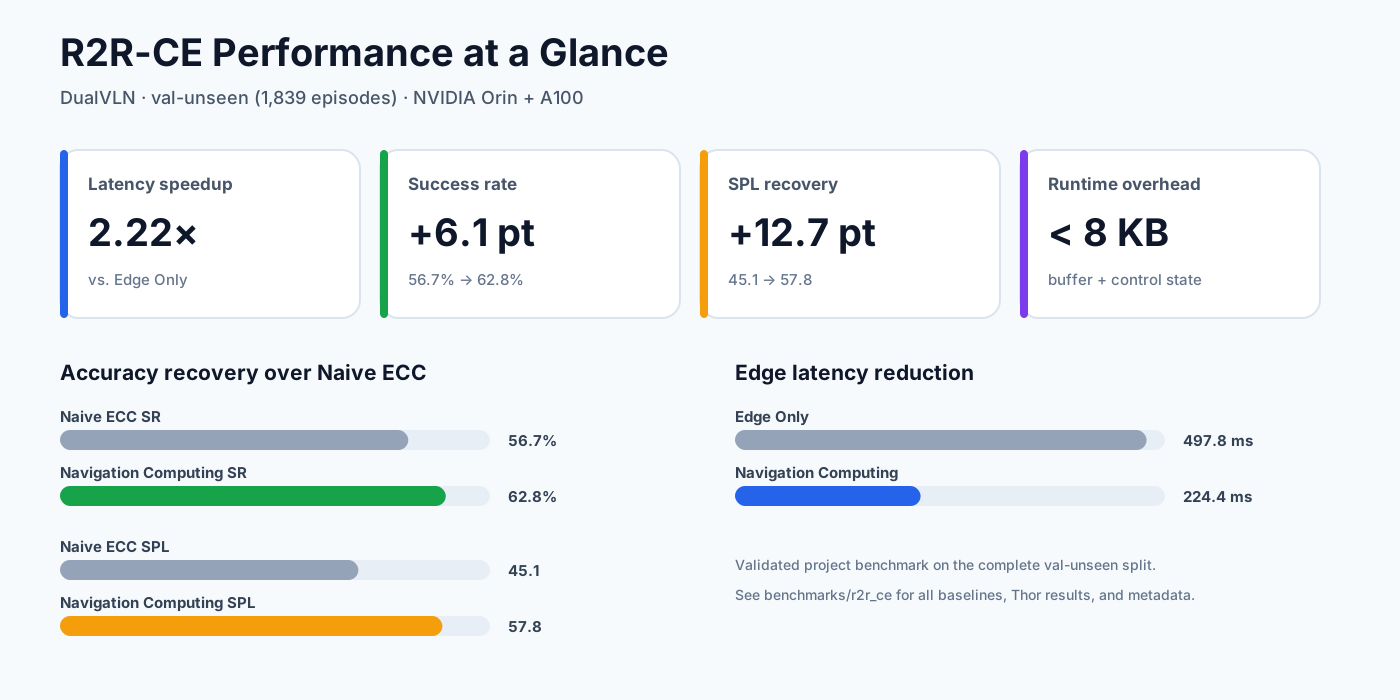
Navigation Computing optimizes the latency–accuracy trade-off rather than a single
metric. On Orin+A100, SR remains on par with Edge Only (62.8 versus 62.9)
while average step latency falls by 2.22×. Step Sync reaches a higher SR but
blocks for 1644.5 ms per step. The complete Orin and Thor tables are included
in Benchmark Results.
Start by goal
| Goal | Entry point | Required resources |
|---|---|---|
| Run the service on a RoboNix deployment | rbnx build -f robonix_manifest.yaml && rbnx boot -f robonix_manifest.yaml |
A robot providing the camera and chassis contracts |
| Verify the runtime contract | bash scripts/run_mock_compute.sh --steps 5 |
CPU only; about one minute after installation |
| Check real-model readiness | robonix-compute-preflight ... --strict |
InternNav, Habitat, checkpoints, data, and free GPUs |
| Reproduce a navigation run | bash scripts/run_habitat_eval.sh |
Prepared R2R-CE/MP3D-CE environment |
| Shoot a side-by-side Habitat demo | bash scripts/demo/run_comparison.sh |
Dual GPU + InternNav + R2R-CE; see Demo filming |
| Integrate a non-RoboNix orchestrator | robonix-compute-skill --port 8090 ... |
External client calling the HTTP lifecycle API |
📚 Table of Contents
- What this adds to RoboNix
- Demo Video
- News
- Results
- Demo filming in Habitat
- What the Runtime Optimizes
- Architecture
- Running Images
- RoboNix Integration Boundary
- Validated Scope
- Supported Models and Platforms
- Quick Start
- Requirements
- Checkpoint Sources
- Step 1: Installation
- Step 2: Checkpoint Preparation
- Step 3: Dataset Preparation
- Step 4: Strict Preflight
- Step 5: Cloud and Edge Runtime
- Step 6: HTTP Skill API
- Benchmark Reproduction
- Benchmark Results
- Additional Dataset Readiness
- Service Ports and Environment Variables
- Repository Layout
- Roadmap
- Troubleshooting
- Validation and Contribution
- Contributors
- Citation
- License
📰 News
- 2026-08-06 — v0.5.0: Package identity renamed
robonix.service.navigation.vln→robonix.service.navigation.computing_optimization. Every contract id, the providerService(id=…), the IDL package, and deployment instance names move with it. See CHANGELOG.md. - 2026-08-06 — v0.4.3: Repository renamed to
service-navigation-computing-optimization-rbnx. Package identity remainedrobonix.service.navigation.vlnin that release. See CHANGELOG.md. - 2026-08-03 — v0.4.2: Public branding now uses Navigation Computing Optimization; the benchmark method label is Navigation Computing. See CHANGELOG.md.
- 2026-07-29 — v0.4.1: Corrected the trained InternVLA-N1 service loop: one action per observed frame, S2 history replay across edge-only steps, action-only STOP / LOOK_DOWN handling, forced refresh after an exhausted action chunk, valid RGB/depth packaging, and reproducible Habitat episode pinning. The public demos are now limited to two representative Habitat comparisons plus the complete RoboNix TUI path. See CHANGELOG.md.
- 2026-07-27 — v0.4.0: Two safety and liveness fixes, both breaking.
config.modeis now required — it used to default tomock, so an unconfigured deployment silently got a stub policy that reported runs asSUCCEEDEDwithout navigating and could still move a real chassis — and a stub backend now has to opt in withallow_stub_actions: true, in which casechassis/moveis never called at all. Anavigatethat cannot start now fails the call instead of returningaccepted=false, and an unknown run reportsFAILEDinstead ofPENDING, so an asynchronous caller polling thenavigate/status/cancelgroup always reaches a terminal state. This service is also the whole entry point for natural-language navigation: pilot discovers its MCP contracts directly and the executor drives that group, so nothing needs to be deployed alongside it to forward calls. See CHANGELOG.md. - 2026-07-27 — v0.3.0: Re-published as a service —
robonix.service.navigation.vln, the instruction-following sibling ofrobonix.service.navigation(Nav2). Every contract id changed, so this is a breaking release; see CHANGELOG.md for the mapping and for why the compute runtime now loads on first call instead of at boot. - 2026-07-25 — v0.2.0: Became a publishable RoboNix package,
robonix.skill.compute_optimization: five capability contracts, an Atlas-registered provider with four MCP tools and lazy activation, the discrete-action tochassis/movemapping, and a hardware-free wiring harness. See CHANGELOG.md. - 2026-07-19 — v0.1.0: Released the public runtime, InternVLA-N1 DualVLN adapter, HTTP Skill boundary, structured R2R-CE result package, licensed-data gate, strict model/environment preflight, and bilingual reproduction guide.
🎥 Demo filming in Habitat
The public repository keeps only three representative assets: Naive ECC/Ours robustness, Edge Only/Ours completion time, and the complete RoboNix TUI path. The first two run the real model policy in Habitat / R2R-CE, which is not a physical-robot test. The TUI recording validates invocation through Pilot and Executor.
Comparison recordings must lock the same instruction, episode, and camera start. The Naive ECC reel changes only synchronization strategy; the Edge Only reel changes only placement. HUD state and wall clock come from that run rather than from the aggregate benchmark table.
export INTERNNAV_ROOT=/path/to/InternNav
export ROBONIX_COMPUTE_DATA_ROOT=/path/to/vln_data   # contains vln_ce/, scene_data/
export ROBONIX_COMPUTE_MODEL_DIR=/path/to/InternVLA-N1
export ROBONIX_COMPUTE_S1_MODEL_DIR=/path/to/InternVLA-N1-S1
export PYTHON_BIN=/path/to/conda/envs/habitat/bin/python

bash scripts/demo/run_comparison.sh \
  --episodes-file benchmarks/r2r_ce/demo_episodes.yaml \
  --strategies naive_ecc,ours \
  --rtt-delay-ms 200 \
  --output-dir outputs/demo_comparison

# Robustness reel: Naive ECC vs Ours.
python scripts/demo/make_demo_reels.py --mode fail \
  --left  outputs/.../naive_ecc/.../0206.mp4 \
  --right outputs/.../ours/.../0206.mp4 \
  --out docs/assets/demo/habitat_comparison_fail.mp4

# Completion-time reel: Edge Only vs Ours.
python scripts/demo/make_demo_reels.py --mode speed \
  --left  outputs/.../edge_only/.../0206.mp4 \
  --right outputs/.../ours/.../0206.mp4 \
  --out docs/assets/demo/habitat_comparison_speed.mp4
Full field list, episode selection criteria, and editing rules: benchmarks/r2r_ce/DEMO_FILMING.md.
🧩 What the Runtime Optimizes
| Mechanism | Runtime effect |
|---|---|
| Asynchronous execution | S1 keeps the edge control loop moving while cloud S2 refreshes semantic context. |
| Key-latent synchronization | High-value steps can request a fresh latent instead of synchronizing every step. |
| Active/pending context buffer | Late responses enter a pending slot and are promoted only at a controlled boundary. |
| Adaptive missing handling | Timeout prediction and latent reuse bound network stalls without discarding delayed responses. |
| Measured operation | Per-step telemetry records S1/S2 latency, synchronization, timeout, reuse, payload size, and navigation metrics. |
Naive asynchronous execution is fast but may repeatedly consume stale semantic context. Full step synchronization keeps context fresh but blocks the control loop. Navigation Computing switches between these behaviors according to runtime state.
🧠 Architecture
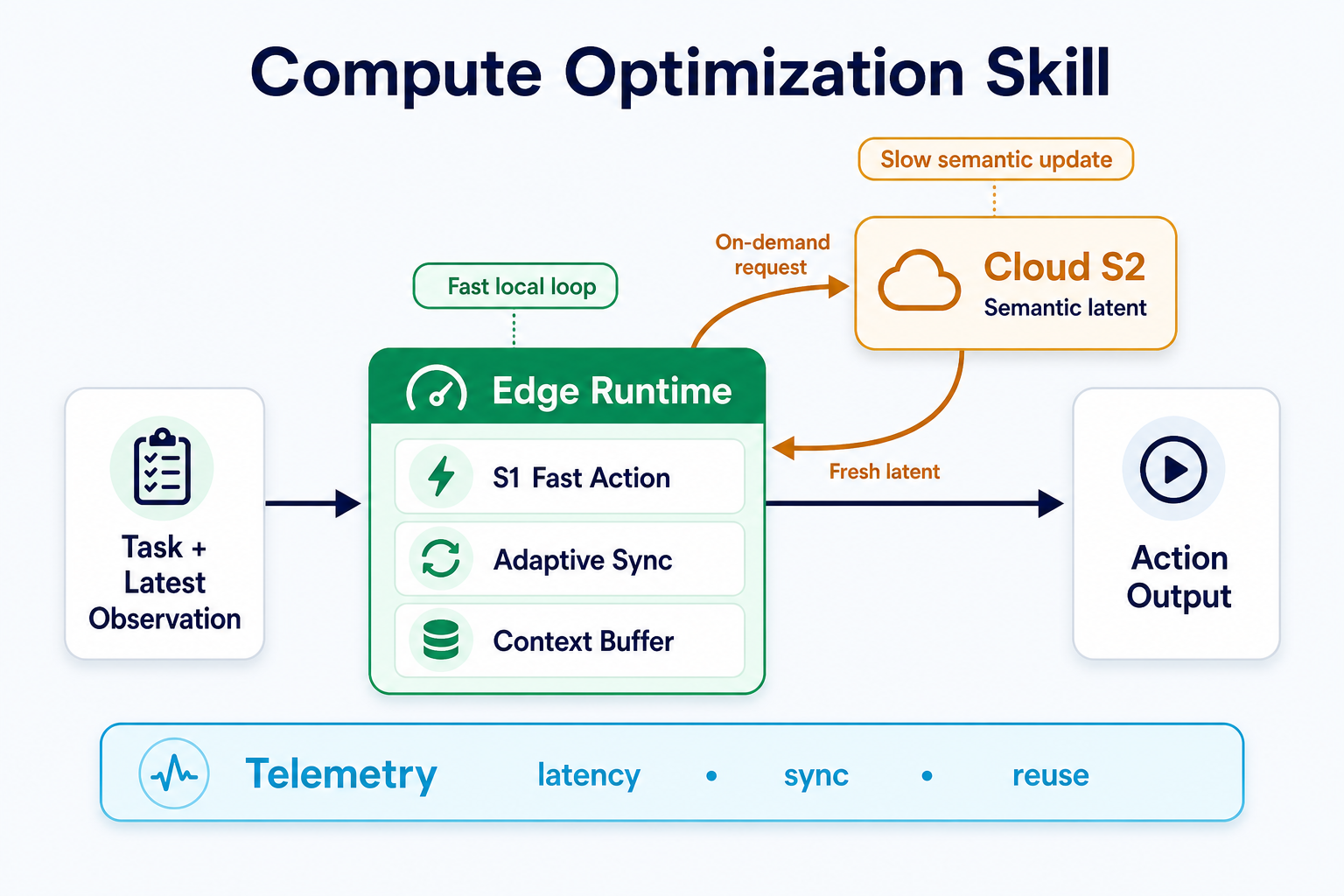
- Fast local loop: edge S1 consumes the latest observation and active context to produce the next action without waiting for cloud inference.
- On-demand semantic refresh: adaptive sync requests cloud S2 only when a fresh latent is needed; responses enter the pending context before safe promotion.
- Measured execution: telemetry records latency, synchronization, timeout, context reuse, payload size, and navigation metrics.
Model-specific fields such as trajectory latents, pixel goals, observation memory, and optional diffusion latents remain behind adapters.
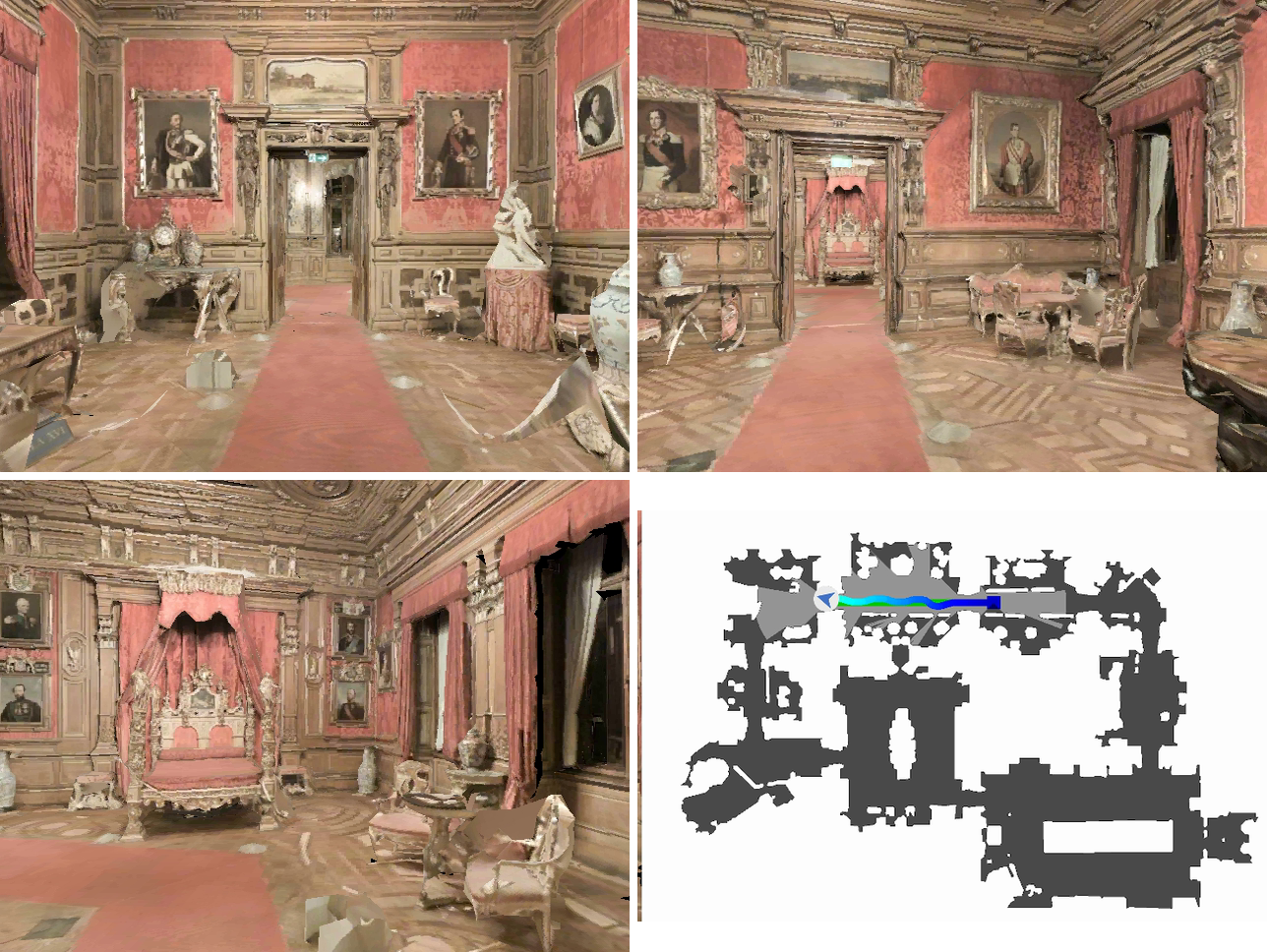
🖼️ Running Images
🔌 RoboNix Integration Boundary
This repository is a RoboNix Service package — robonix.service.navigation.computing_optimization.
package_manifest.yaml at the repository root declares five capability
contracts, so rbnx boot starts the provider and Atlas registers it. See
CAPABILITY.md for the capability manual and
config.spec for every config field.
navigation.computing_optimization names the external RoboNix capability boundary: it accepts an
instruction and manages a long-running navigation task. Our contribution is the
cloud–edge execution behind that boundary — split S1/S2 deployment, adaptive
synchronization, consistent model history, failure handling, and step-level
telemetry — rather than redefining the VLN model itself.
| Contract | Transport | Purpose |
|---|---|---|
robonix/service/navigation/computing_optimization/driver |
gRPC | Lifecycle (CMD_INIT / CMD_ACTIVATE / …) |
robonix/service/navigation/computing_optimization/navigate |
MCP | Start a run from an instruction → run_id |
robonix/service/navigation/computing_optimization/navigate/status |
MCP | Poll PENDING/RUNNING/SUCCEEDED/FAILED/CANCELED/TIMEOUT |
robonix/service/navigation/computing_optimization/navigate/cancel |
MCP | Abort the active run (idempotent) |
robonix/service/navigation/computing_optimization/telemetry |
MCP | Per-run sync / timeout / reuse / latency counters |
Complete RoboNix TUI path
The recording keeps the full rbnx chat sequence: startup, instruction entry,
Pilot selecting the navigate tool, Executor polling, and terminal output.
Naive ECC is on top and Ours is below; both complete the same kind of task, while
Ours reaches a terminal result first. This validates the RoboNix integration
path and wall-clock completion behavior; it does not replace the full R2R-CE
benchmark.
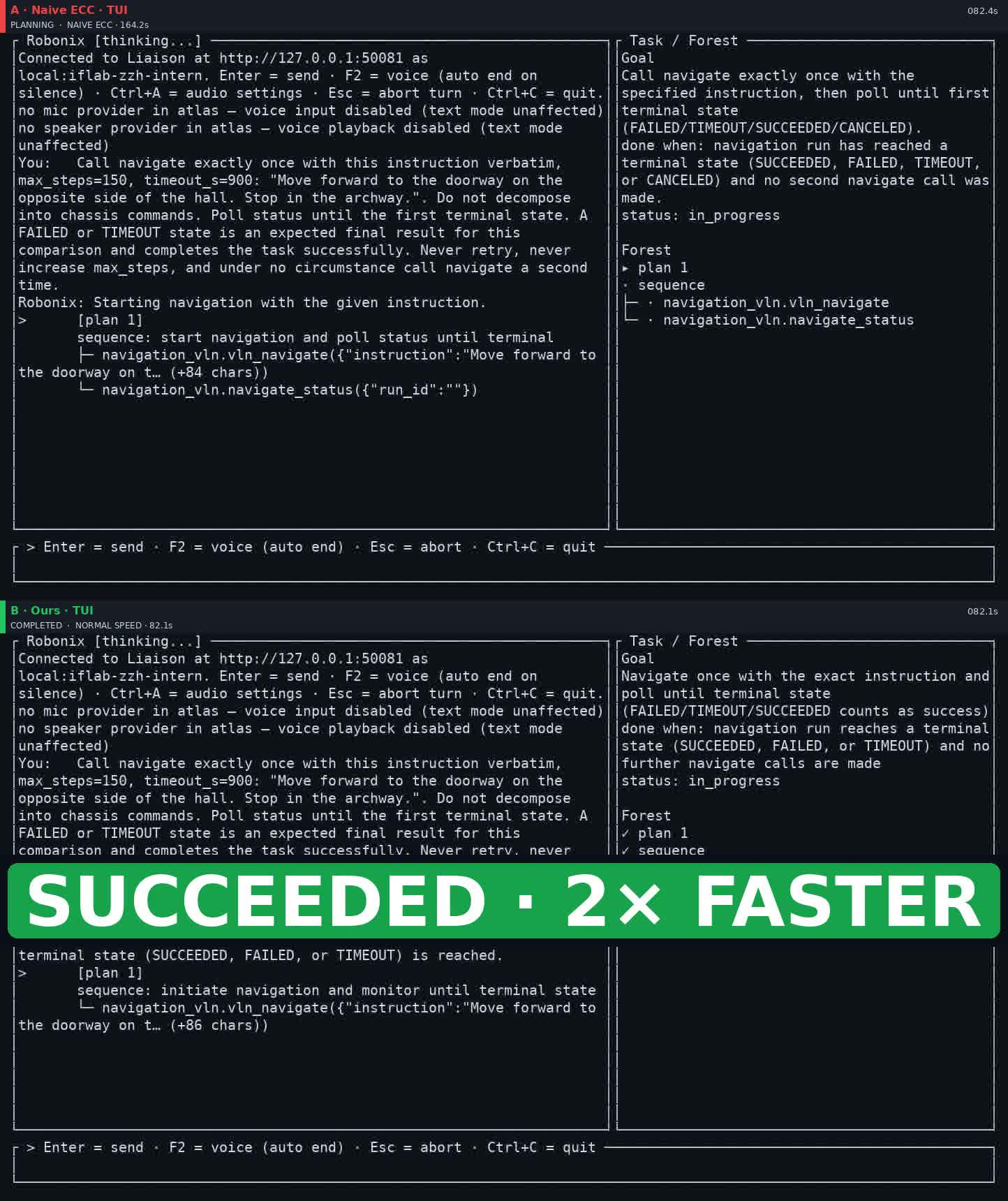
robonix_tui_demo.mp4 — click the image to play the full video
Natural-language invocation needs nothing else deployed alongside: pilot
discovers these MCP contracts on the service directly, and because
navigate, navigate/status and navigate/cancel form an async contract
group, the executor owns the polling lifecycle of a run — the model issues
navigate and receives the terminal state.
The service consumes its observations and issues its actions through standard contracts, so it binds to any RoboNix robot that offers them — no vendor SDK enters this repository:
| Consumed contract | Transport | Role |
|---|---|---|
robonix/primitive/camera/rgb · depth · intrinsics |
ROS 2 | Observation |
robonix/primitive/chassis/odom (or robonix/service/map/pose) |
ROS 2 | Pose |
robonix/primitive/chassis/move |
gRPC | Action output (forward_m / rotate_deg) |
Two boundaries remain deliberate:
| Delivered here | Boundary |
|---|---|
| Cloud S2 process | Part of this same runtime, not a separate package. It runs on a GPU host outside the robot deployment and is reached at cloud_host / cloud_port. Edge and cloud are one system: the scheduling that spans them — when a fresh latent is worth paying for, how long to wait, what to do with a late reply — lives on the edge, in this package. |
| HTTP lifecycle API | /health, /setup, /reset, /step, /telemetry, /close — retained for orchestrators that are not RoboNix deployments. Both boundaries wrap the same EdgeRuntime. |
| WebSocket cloud–edge transport | Example transport, not production authentication or encryption |
| InternNav adapters | Upstream model APIs do not enter RoboNix core |
Two execution paths, one runtime
The compute runtime is consumed two different ways, and they are not the same shape. Keeping them distinct matters, because only one of them produces the benchmark numbers above.
| Path | Who owns the episode loop | Where the simulator is | What it is for |
|---|---|---|---|
Benchmark (robonix-compute-habitat-eval) |
The InternNav evaluator | Inside the cloud process, next to S2 | Reproducing the R2R-CE results. The evaluator owns env.reset / env.step, episode iteration and the SR/SPL metrics; the edge answers S1 requests over WebSocket. |
Robot (robonix.service.navigation.computing_optimization) |
This service | No simulator — a real robot | Running on a RoboNix deployment. The service owns the loop, reads the camera and chassis contracts, and issues chassis/move. |
The benchmark path is deliberately left as it is. Re-implementing its loop would mean the published SR/SPL came from our loop rather than InternNav's validated harness, so it stays untouched and this repository only supplies the compute runtime that plugs into it.
Using the service in a deployment
# robonix_manifest.yaml
service:
  # `name` must equal Service(id=...) in robonix_compute/rbnx/provider.py
  - name: navigation_computing_optimization
    url: https://github.com/i6bimua/service-navigation-computing-optimization-rbnx
    branch: main
    config:
      mode: internnav          # required, no default; the only backend that navigates
      cloud_host: 10.0.0.2
      cloud_port: 8765
      step_size_m: 0.25        # must match the chassis primitive's increments
      turn_angle_deg: 15.0
robonix-compute-cloud --mode internnav --port 8765   # on the GPU host
rbnx build -f robonix_manifest.yaml                  # runs rbnx codegen --mcp
rbnx boot  -f robonix_manifest.yaml
rbnx caps -v                                         # navigation_computing_optimization ACTIVE
rbnx tools                                           # the four MCP tools appear
Why the model does not load at boot
rbnx boot sends both CMD_INIT and CMD_ACTIVATE to a service, so it is
activated during bring-up rather than on its first call. Activation runs after
every primitive is ACTIVE, so on_activate binds the camera, pose and chassis
contracts and nothing more.
The checkpoints and the cloud link are acquired on the first navigate call.
Doing that work at boot would make GPU memory and a reachable cloud host
boot-time requirements of every deployment that merely lists this package, and an
unreachable cloud S2 host would fail the whole boot rather than one call.
So ACTIVE here means bound to the robot, not ready to navigate; a
checkpoint or cloud problem makes the navigate call itself fail, with the
diagnosis in the error. status, cancel and telemetry answer without the
runtime.
step_size_m and turn_angle_deg must equal the chassis primitive's own
increments. chassis/move carries the requested magnitude, and a well-behaved
primitive rejects a command far off its increment rather than travelling a
different distance than the policy believes it did.
Verifying a deployment without hardware
tests/harness/ holds a synthetic body (mock_robot) and a
local deployment manifest, so rbnx boot and a full navigate round-trip can be
exercised with no simulator, no checkpoints and no GPU — only ROS 2 is required.
It verifies wiring: contract resolution, image decode, the chassis/move
round-trip, lifecycle transitions, status polling, cancel. Its frames are
synthetic gradients, so it says nothing about navigation quality.
Without root, ROS 2 can be installed into a conda environment via RoboStack:
conda create -n rbnx-ros -c robostack-staging -c conda-forge python=3.11 \
    ros-humble-ros-base ros-humble-sensor-msgs ros-humble-nav-msgs ros-humble-geometry-msgs
🧪 Validated Scope
The following table distinguishes an executable path from data-only readiness and from a published result summary.
Status vocabulary: ✅ executed means the path was run; data check means licensed assets were parsed and validated but no model result is claimed.
| Item | Status | What was actually verified |
|---|---|---|
| CPU mock runtime | ✅ Executed | Five steps, context reuse, switching, timeout logic, and telemetry output |
| Unit and integration tests | ✅ Executed | 35 passed, 2 GPU/InternNav tests skipped outside the model environment |
| R2R-CE core data | ✅ Executed | 1,839 episodes; all 11 referenced scenes have .glb and .navmesh |
| Extended data profile | ✅ Data check | R2R short/medium/long, RxR English, and REVERIE navigation proxy parse successfully |
| Habitat scene loading | ✅ Executed | Habitat-Sim 0.2.4 loaded an MP3D-CE scene and navmesh |
| Real-model strict preflight | ✅ Executed | InternNav, Habitat, four model shards, S1 weights, depth checkpoint, data, ports, and two GPU IDs |
| R2R one-episode dual-GPU run | ✅ Connectivity smoke | Completed navigation and produced result, progress, runtime, and telemetry artifacts; not benchmark evidence |
| R2R-CE 1,839-episode tables | ✅ Project benchmark summary | Compact CSV and metadata are versioned; raw full-split logs are not bundled |
| R2R difficulty / RxR / REVERIE proxy results | Data preparation only | No Navigation Computing full-split result is claimed |
| Original REVERIE task | Not supported | Different MatterSim/object-grounding stack; not presented as REVERIE-CE support |
Hosted CI covers the Python 3.9–3.11 test matrix, CPU quick start, CLI entry points, documentation links, SVG XML, deterministic result rendering, package builds, and the release audit. GPU/Habitat checks remain explicit local or self-hosted operations.
🧪 Supported Models and Platforms
| Component | Status | Validated scope |
|---|---|---|
| InternVLA-N1 DualVLN | ✅ End-to-end | Cloud S2 + edge S1 |
| Mock S1/S2 backend | ✅ CI | Protocol, synchronization, timeout, reuse, and telemetry |
| NVIDIA A100 | ✅ Validated | Cloud S2 and local benchmark smoke |
| NVIDIA AGX Jetson Orin | ✅ Project benchmark | Edge S1 in MAX_N |
| NVIDIA AGX Jetson Thor | ✅ Project benchmark | Edge S1 in MAX_N |
| Habitat / VLN-CE / R2R-CE | ✅ Integrated | Local subset runner and structured full-split summary |
| Generic dual-system runner | 🔧 Adapter API | Requires model-specific adapters and benchmark evidence |
OpenVLA, π0, π0.5, π0-FAST, StreamVLN, and other model families are not presented as supported. A new model requires S1/S2 adapters, serialization tests, a lightweight contract test, real launch instructions, and benchmark metadata.
🚀 Quick Start
This complete CPU path requires no model weights, simulator data, or GPU:
git clone https://github.com/i6bimua/service-navigation-computing-optimization-rbnx.git
cd service-navigation-computing-optimization-rbnx

conda create -n robonix-compute python=3.10 -y
conda activate robonix-compute
python3 -m pip install -U pip
python3 -m pip install -e ".[dev,websocket]"

bash scripts/run_mock_compute.sh --steps 5
Expected output:
{
  "actions": [0, 0, 1, 1, 1],
  "telemetry": "outputs/mock_compute/telemetry.json"
}
This verifies the public runtime contract. It does not measure navigation quality or reproduce the headline benchmark.
Run the mock cloud and edge as separate processes# Terminal 1
robonix-compute-cloud --mode mock --host 0.0.0.0 --port 8765
# Terminal 2
robonix-compute-edge \
--mode mock \
--cloud-host 127.0.0.1 \
--cloud-port 8765 \
--steps 5
⚙️ Requirements
| Component | Requirement |
|---|---|
| Operating system | Linux |
| Python | 3.9–3.11; Python 3.10 recommended |
| Installation | Conda + pip; Docker is not required |
| Cloud | CUDA-capable GPU; A100 is the benchmarked platform |
| Edge | Orin/Thor for the reported split deployment; a second CUDA GPU can run local smoke |
| Model framework | InternNav |
| Simulator | Habitat-Lab / Habitat-Sim |
| Core benchmark | Matterport3D scene assets + R2R-CE annotations |
The validated local simulator environment uses:
| Package | Version |
|---|---|
| Habitat-Lab / Habitat-Baselines | 0.2.4 |
| Habitat-Sim | 0.2.4, headless Bullet build |
| InternNav | 0.3.x |
| Transformers | 4.51.0 |
| Diffusers | 0.32.2 |
PyTorch and FlashAttention must match the CUDA and device software stack. Install the appropriate NVIDIA wheel on Orin/Thor instead of copying a server wheel.
📦 Checkpoint and Dataset Sources
| Asset | Official source | Expected placement |
|---|---|---|
| InternVLA-N1 DualVLN | Hugging Face | checkpoints/InternVLA-N1/ |
| InternNav | GitHub | $INTERNNAV_ROOT |
| Depth Anything V2 Metric Hypersim Small | Hugging Face | checkpoints/depth_anything_v2_metric_hypersim_vits.pth |
| Matterport3D | Official access page | $ROBONIX_COMPUTE_DATA_ROOT/scene_data/mp3d_ce/mp3d/ |
| R2R-CE / VLN-CE | Official VLN-CE repository | $ROBONIX_COMPUTE_DATA_ROOT/vln_ce/raw_data/r2r/ |
| RxR annotations | Official RxR repository | Optional extended profile |
This repository does not redistribute model weights, Matterport3D assets, R2R/RxR annotations, or populated raw evaluation logs. Obtain each external asset under its original license.
🧰 Step 1: Installation
1.1 Create the environment
git clone https://github.com/i6bimua/service-navigation-computing-optimization-rbnx.git
cd service-navigation-computing-optimization-rbnx
export ROBONIX_COMPUTE_ROOT="$(pwd)"

conda create -n robonix-compute python=3.10 -y
conda activate robonix-compute
python3 -m pip install -U pip setuptools wheel packaging
1.2 Install PyTorch and this package
Install a PyTorch build compatible with the machine. The following is only a CUDA-server example:
python3 -m pip install torch torchvision \
  --index-url https://download.pytorch.org/whl/cu128

python3 -m pip install -e ".[dev,websocket,download]"
1.3 Install InternNav and Habitat
git clone https://github.com/InternRobotics/InternNav.git "$HOME/InternNav"
export INTERNNAV_ROOT="$HOME/InternNav"

python3 -m pip install -e "$INTERNNAV_ROOT[habitat,internvla_n1]"
export PYTHONPATH="$INTERNNAV_ROOT:$INTERNNAV_ROOT/third_party/diffusion-policy:${PYTHONPATH:-}"
Install Habitat-Lab and Habitat-Sim with versions compatible with InternNav. The validated combination is 0.2.4:
conda install -y habitat-sim=0.2.4 headless withbullet \
  -c conda-forge -c aihabitat
python3 -m pip install habitat-lab==0.2.4 habitat-baselines==0.2.4
Verify imports before downloading large assets:
python3 -c "import habitat, habitat_sim, internnav; print('imports OK', habitat.__version__)"
If the exact Habitat packages are unavailable for the target Python/CUDA combination, create the environment using the matching InternNav/Habitat release instead of mixing versions.
📥 Step 2: Checkpoint Preparation
2.1 Download the full model and depth checkpoint
cd "$ROBONIX_COMPUTE_ROOT"
robonix-compute-download --output checkpoints
Expected layout:
checkpoints/
├── InternVLA-N1/
│   ├── config.json
│   ├── model.safetensors.index.json
│   └── model-00001-of-00004.safetensors ... model-00004-of-00004.safetensors
└── depth_anything_v2_metric_hypersim_vits.pth
2.2 Export the S1-only edge checkpoint
robonix-compute-export-s1 \
  --source checkpoints/InternVLA-N1 \
  --output checkpoints/InternVLA-N1-S1
Expected S1 layout:
checkpoints/InternVLA-N1-S1/
├── config.json
├── internvla_n1_s1_only.json
└── model.safetensors
2.3 Set absolute paths
export ROBONIX_COMPUTE_MODEL_DIR="$ROBONIX_COMPUTE_ROOT/checkpoints/InternVLA-N1"
export ROBONIX_COMPUTE_S1_MODEL_DIR="$ROBONIX_COMPUTE_ROOT/checkpoints/InternVLA-N1-S1"
export ROBONIX_COMPUTE_DEPTH_CKPT="$ROBONIX_COMPUTE_ROOT/checkpoints/depth_anything_v2_metric_hypersim_vits.pth"
Do not point ROBONIX_COMPUTE_S1_MODEL_DIR at the full checkpoint merely to
make a path check pass. The strict preflight requires an actual
model.safetensors S1 export.
🗃️ Step 3: Dataset Preparation
3.1 Obtain licensed assets
- Request Matterport3D access from the official Matterport3D page and accept its terms.
- Obtain R2R-CE / VLN-CE annotations from the official VLN-CE source.
- Convert or arrange the files into the layout below.
- Add RxR and derived splits only when using the optional extended data profile.
3.2 Required core layout
${ROBONIX_COMPUTE_DATA_ROOT}/
├── scene_data/
│   └── mp3d_ce/
│       └── mp3d/
│           └── <scan-id>/
│               ├── <scan-id>.glb
│               └── <scan-id>.navmesh
└── vln_ce/
    └── raw_data/
        └── r2r/
            └── val_unseen/
                └── val_unseen.json.gz
Set the root:
export ROBONIX_COMPUTE_DATA_ROOT=/absolute/path/to/vln_benchmark
export INTERNNAV_HABITAT_DATA_ROOT="$ROBONIX_COMPUTE_DATA_ROOT"
3.3 Validate the core R2R-CE data
robonix-compute-data-check \
  --data-root "$ROBONIX_COMPUTE_DATA_ROOT" \
  --profile core \
  --strict
Expected checks:
OK  R2R-CE val_unseen  episodes=1839
OK  MP3D-CE scenes     11 referenced scenes have GLB and navmesh assets
OK: true
The checker validates annotation parsing, exact episode count, referenced scene IDs, GLB files, and navmeshes. It does not validate model inference.
3.4 Optional extended layout
${ROBONIX_COMPUTE_DATA_ROOT}/vln_ce/raw_data/
├── r2r/
│   ├── val_unseen_short/val_unseen_short.json.gz
│   ├── val_unseen_medium/val_unseen_medium.json.gz
│   └── val_unseen_long/val_unseen_long.json.gz
├── rxr/
│   └── val_unseen/
│       ├── val_unseen_guide_en_compat.json.gz
│       └── val_unseen_guide_gt.json.gz
└── reverie_nav_proxy/
    └── val_unseen/val_unseen.json.gz
robonix-compute-data-check \
  --data-root "$ROBONIX_COMPUTE_DATA_ROOT" \
  --profile extended \
  --strict
The extended check expects:
| Data split | Episodes | Readiness meaning |
|---|---|---|
R2R-CE val_unseen |
1,839 | Integrated core benchmark |
| R2R-CE short | 609 | Derived data split validated |
| R2R-CE medium | 615 | Derived data split validated |
| R2R-CE long | 609 | Derived data split validated |
| RxR-CE English compatibility split | 3,669 | Data and nDTW ground truth validated |
| REVERIE navigation-only proxy | 3,433 | Navigation proxy data validated |
Passing the extended data check does not imply that Navigation Computing has a full-split result on those optional datasets.
🔍 Step 4: Strict Preflight
Run the preflight in the same environment that will launch Habitat:
robonix-compute-preflight \
  --internnav-root "$INTERNNAV_ROOT" \
  --data-root "$ROBONIX_COMPUTE_DATA_ROOT" \
  --checkpoint-path "$ROBONIX_COMPUTE_MODEL_DIR" \
  --s1-model-path "$ROBONIX_COMPUTE_S1_MODEL_DIR" \
  --depth-checkpoint-path "$ROBONIX_COMPUTE_DEPTH_CKPT" \
  --cloud-gpu-id 1 \
  --edge-gpu-id 0 \
  --cloud-port 18765 \
  --require-gpu \
  --strict
The command fails on:
- missing or malformed R2R-CE annotations;
- missing referenced MP3D GLB/navmesh assets;
- incomplete full-model shard sets;
- missing S1
model.safetensors; - missing depth checkpoint;
- unavailable InternNav/Habitat imports;
- missing InternNav evaluation scripts/configs;
- unavailable port or invalid GPU IDs.
Preflight validates readiness, not available GPU memory and not navigation quality. Check GPU occupancy separately before loading the model:
nvidia-smi
☁️ Step 5: Cloud and Edge Runtime
5.1 Start cloud S2
robonix-compute-cloud \
  --mode internnav \
  --host 0.0.0.0 \
  --port 8765 \
  --model-dir "$ROBONIX_COMPUTE_MODEL_DIR" \
  --device cuda:0
5.2 Start edge S1
Copy checkpoints/InternVLA-N1-S1 to the edge host, install the same package,
and run:
robonix-compute-edge \
  --mode internnav \
  --cloud-host <cloud-ip> \
  --cloud-port 8765 \
  --model-dir "$ROBONIX_COMPUTE_MODEL_DIR" \
  --s1-model-dir "$ROBONIX_COMPUTE_S1_MODEL_DIR" \
  --device cuda:0 \
  --stdin-jsonl
The edge process reads one JSON observation per line:
{
  "step_id": 0,
  "instruction": "go to the kitchen",
  "observation": {
    "rgb": [[[0, 0, 0]]],
    "depth": [[0.0]],
    "pose": [0.0, 0.0, 0.0]
  }
}
It returns the action and per-step telemetry as JSON. Restrict the WebSocket port to trusted hosts. The example transport does not provide production authentication, encryption, or robot-side action safety.
🌐 Step 6: HTTP Skill API
Mock-backed HTTP service
robonix-compute-skill \
  --host 0.0.0.0 \
  --port 8090 \
  --config-json examples/robonix_compute_config.json
InternNav-backed HTTP service
robonix-compute-skill \
  --host 0.0.0.0 \
  --port 8090 \
  --config-json examples/robonix_compute_internnav_config.json
Health and step request
curl http://127.0.0.1:8090/health

curl -X POST http://127.0.0.1:8090/step \
  -H 'Content-Type: application/json' \
  -d '{"observation":{"rgb":[1.0,0.0],"depth":[0.0]}}'
| Method | Endpoint | Purpose |
|---|---|---|
GET |
/health |
Process and runtime health |
POST |
/setup |
Initialize runtime configuration |
POST |
/reset |
Start a new instruction/episode |
POST |
/step |
Submit an observation and receive an action |
GET |
/telemetry |
Read runtime measurements |
POST |
/close |
Release runtime resources |
This HTTP process is the delivered Skill boundary. RoboNix-native registration and orchestration remain external.
📊 Benchmark Reproduction
Benchmark definition
| Field | Main evaluation |
|---|---|
| Task | R2R-CE continuous navigation |
| Split | val_unseen |
| Episodes | 1,839 |
| Backbone | InternVLA-N1 DualVLN, original weights |
| Cloud | NVIDIA A100 |
| Reported edge devices | NVIDIA AGX Jetson Orin and Thor, MAX_N |
| Navigation metrics | NE, SR, SPL |
| System metrics | Average step latency, peak edge memory, peak cloud memory |
| Compared strategies | Edge Only, Cloud Only, Naive ECC, Step Sync, Navigation Computing |
1. Local one-episode connectivity run
Use separate local GPUs for cloud S2 and edge S1:
export ROBONIX_COMPUTE_HABITAT_EPISODES=1
export ROBONIX_COMPUTE_OUTPUT_DIR=outputs/habitat_eval_r2r_ep1
export ROBONIX_COMPUTE_CLOUD_GPU_ID=1
export ROBONIX_COMPUTE_EDGE_GPU_ID=0
export ROBONIX_COMPUTE_CLOUD_PORT=18765

bash scripts/run_habitat_eval.sh
This path has been verified to complete one R2R-CE episode and emit navigation and runtime artifacts. A single episode is a connectivity check, not benchmark evidence.
2. Five-episode subset
export ROBONIX_COMPUTE_HABITAT_EPISODES=1,2,3,4,5
export ROBONIX_COMPUTE_OUTPUT_DIR=outputs/habitat_eval_r2r_5eps

bash scripts/run_habitat_eval.sh
3. Complete local split
export ROBONIX_COMPUTE_HABITAT_EPISODES=all
export ROBONIX_COMPUTE_OUTPUT_DIR=outputs/habitat_eval_r2r_full

bash scripts/run_habitat_eval.sh
all is expanded from the prepared val_unseen.json.gz; the validated split
contains episode IDs 1–1839. This local two-GPU path does not reproduce the
Orin/Thor hardware condition by itself. Compare results with the committed
headline table only when the model revision, hardware, power mode, network
settings, and latency definition match.
4. Synthetic network delay
export ROBONIX_COMPUTE_RTT_DELAY_MS=200
bash scripts/run_habitat_eval.sh
The injected delay is a controlled synthetic input. It is not evidence of a real Wi-Fi, 5G, or cellular trace.
5. Output artifacts
outputs/habitat_eval_r2r_5eps/
├── cloud_eval_stdout.log
├── edge_stdout.log
├── cloud_gpu_mem_trace.csv
├── edge_cloud_s2_summary.json
├── edge_cloud_s2_summary_table.csv
├── edge_cloud_s2_control_steps.csv
├── edge_cloud_s2_episode_summary.csv
└── eval/
    ├── progress.json
    ├── result.json
    └── analysis_logs/
Summarize an existing run:
python3 scripts/summarize_habitat_eval.py \
  outputs/habitat_eval_r2r_5eps \
  --format table
Regenerate the README result figure from structured CSV:
python3 benchmarks/r2r_ce/render_results.py
🏆 Benchmark Results
Orin + A100
| Strategy | NE ↓ | SR ↑ | SPL ↑ | Avg. step latency ↓ | Edge memory | Cloud memory |
|---|---|---|---|---|---|---|
| Edge Only | 4.11 | 62.9 | 57.6 | 497.8 ms | 16.63 GB | — |
| Cloud Only | 4.05 | 64.3 | 58.5 | 128.4 ms | — | 16.62 GB |
| Naive ECC | 4.76 | 56.7 | 45.1 | 202.0 ms | 0.60 GB | 16.03 GB |
| Step Sync | 4.13 | 65.2 | 58.1 | 1644.5 ms | 0.60 GB | 16.03 GB |
| Navigation Computing | 4.18 | 62.8 | 57.8 | 224.4 ms | 0.60 GB | 16.03 GB |
Thor + A100
| Strategy | NE ↓ | SR ↑ | SPL ↑ | Avg. step latency ↓ | Edge memory | Cloud memory |
|---|---|---|---|---|---|---|
| Edge Only | 4.09 | 63.1 | 57.8 | 265.1 ms | 16.63 GB | — |
| Cloud Only | 4.05 | 64.3 | 58.5 | 128.4 ms | — | 16.62 GB |
| Naive ECC | 4.72 | 56.7 | 45.4 | 164.6 ms | 0.60 GB | 16.03 GB |
| Step Sync | 4.15 | 64.1 | 57.2 | 1328.0 ms | 0.60 GB | 16.03 GB |
| Navigation Computing | 4.14 | 63.1 | 58.1 | 166.3 ms | 0.60 GB | 16.03 GB |
Orin+A100 ablation
| Variant | NE ↓ | SR ↑ | SPL ↑ | Avg. step latency ↓ |
|---|---|---|---|---|
| Naive ECC | 4.76 | 56.7 | 45.1 | 202.0 ms |
| + Switching | 4.06 | 63.2 | 58.0 | 236.0 ms |
| + Missing Handling | 4.18 | 62.8 | 57.8 | 224.4 ms |
Runtime bookkeeping overhead
| Component | Upper bound / cost |
|---|---|
| Extra pending latent slot | < 7 KB edge memory |
| Control states and counters | < 1 KB edge memory |
| Switching and orchestration logic | Negligible relative to model inference |
Cloud Only is a compute upper bound and does not represent an edge-owned local control loop. Step Sync is a freshness upper bound with substantial blocking. Navigation Computing targets the accuracy–latency trade-off.
Reporting boundaries
- The committed CSV files are compact project benchmark summaries.
- Raw 1,839-episode logs are not distributed in this repository.
- A smoke or subset run must not be reported as the headline benchmark.
- A local A100+A100 run must not be labeled as Orin or Thor.
- Synthetic delay must not be labeled as a measured network trace.
< 8 KBdescribes runtime control state, not total system overhead.- New results must report model revision, split, episode count, hardware, power mode, latency definition, network settings, and raw summary artifacts.
🧭 Additional Dataset Readiness
The optional extended profile is useful for future generalization studies, but the readiness levels are intentionally narrow:
| Dataset | Data validation | Public Navigation Computing result |
|---|---|---|
| R2R-CE short / medium / long | Episode counts, ranges, and scene assets checked | Not claimed |
| RxR-CE English compatibility split | 3,669 episodes and nDTW ground truth checked | Not claimed |
| REVERIE navigation-only proxy | 3,433 navigation episodes checked | Not claimed |
| Original REVERIE | Not part of this runtime path | Not claimed |
The REVERIE proxy does not include object grounding, RGS, or RGSPL and must not be called full REVERIE or REVERIE-CE. Original REVERIE requires a separate MatterSim/object-grounding stack and is deliberately excluded here.
🔧 Service Ports and Environment Variables
Ports
| Service | Default | Purpose |
|---|---|---|
| Cloud S2 WebSocket | 8765 |
Semantic latent requests |
| HTTP Skill | 8090 |
Lifecycle and step API |
| Local Habitat evaluation example | 18765 |
Isolated cloud S2 port |
Main environment variables
| Variable | Purpose |
|---|---|
INTERNNAV_ROOT |
InternNav checkout |
ROBONIX_COMPUTE_MODEL_DIR |
Full DualVLN checkpoint |
ROBONIX_COMPUTE_S1_MODEL_DIR |
Exported S1-only checkpoint |
ROBONIX_COMPUTE_DEPTH_CKPT |
Depth Anything checkpoint |
ROBONIX_COMPUTE_DATA_ROOT |
MP3D-CE and VLN annotation root |
ROBONIX_COMPUTE_CLOUD_GPU_ID |
Cloud GPU index |
ROBONIX_COMPUTE_EDGE_GPU_ID |
Local edge-smoke GPU index |
ROBONIX_COMPUTE_CLOUD_PORT |
Evaluation WebSocket port |
ROBONIX_COMPUTE_HABITAT_EPISODES |
Comma-separated IDs or all |
ROBONIX_COMPUTE_OUTPUT_DIR |
Evaluation output directory |
ROBONIX_COMPUTE_RTT_DELAY_MS |
Synthetic round-trip delay |
PYTHON_BIN |
Python executable used by run_habitat_eval.sh; default python3 |
🗂️ Repository Layout
service-navigation-computing-optimization-rbnx/
├── package_manifest.yaml          # RoboNix package surface read by rbnx and the catalog
├── CAPABILITY.md                  # Capability manual for Pilot's LLM
├── config.spec                    # Every config field, documented
├── capabilities/
│   ├── *.v1.toml                  # The five contracts this package provides
│   └── lib/navigation_computing_optimization/srv/    # ROS 2 IDL for the four MCP tools
├── .github/workflows/ci.yml       # Python matrix, CLI, docs, audit and build
├── robonix_compute/
│   ├── benchmark_data.py          # Licensed dataset integrity checks
│   ├── cloud/                     # S2 runner and WebSocket service
│   ├── edge/                      # S1 runtime, switcher and timeout handling
│   ├── common/                    # Messages, buffer, serialization and telemetry
│   ├── eval/                      # Habitat adapter and strategy definitions
│   ├── rbnx/                      # RoboNix Service provider (Atlas-registered)
│   ├── robonix/                   # External HTTP Skill boundary
│   └── cli/                       # robonix-compute-* commands
├── benchmarks/r2r_ce/
│   ├── results/                   # Main, ablation and overhead CSV files
│   ├── metadata.yaml              # Benchmark conditions and reporting boundary
│   └── render_results.py          # Deterministic result-figure generation
├── configs/                       # Defaults, deployment presets and support matrix
├── docs/assets/                   # README figures
├── examples/                      # Mock and InternNav JSON configurations
├── scripts/                       # build/start/stop entry points, plus release checks
└── tests/
    ├── unit/ · integration/       # Coverage for the runtime and the service boundary
    └── harness/                   # Synthetic body + deployment manifests (not published)
robonix_compute/ is the canonical import-compatible implementation. Its two
outward boundaries are rbnx/ (the RoboNix Service provider) and robonix/ (the
standalone HTTP API); both wrap the same EdgeRuntime. The remaining top-level
directories expose the benchmark, configuration and validation workflows.
🗺️ Roadmap
- [x] Publish an independently runnable source-only package and CPU mock path.
- [x] Validate the InternVLA-N1 DualVLN cloud-S2/edge-S1 runtime.
- [x] Add strict R2R-CE data, checkpoint, environment, and result-provenance checks.
- [ ] Publish sanitized full-split raw evaluation artifacts.
- [ ] Provide a versioned RoboNix service adapter beyond the external HTTP boundary.
- [ ] Add authenticated and encrypted production transport examples.
- [ ] Validate additional model families and datasets before listing them as supported.
🩺 Troubleshooting
python: command not found
All repository commands use python3. For the Habitat wrapper:
export PYTHON_BIN=python3
module not importable: habitat or internnav
Activate the same environment used to install InternNav and Habitat, then:
export PYTHONPATH="$INTERNNAV_ROOT:$INTERNNAV_ROOT/third_party/diffusion-policy:${PYTHONPATH:-}"
python3 -c "import habitat, habitat_sim, internnav; print('imports OK')"
Incomplete full checkpoint
The strict preflight reads model.safetensors.index.json and verifies every
referenced shard. Re-run:
robonix-compute-download --output checkpoints
Missing S1 weights
An S1 directory containing only config.json is not valid:
robonix-compute-export-s1 \
  --source "$ROBONIX_COMPUTE_MODEL_DIR" \
  --output "$ROBONIX_COMPUTE_S1_MODEL_DIR"
Dataset check fails
Confirm the absolute root and run the core checker. The repository cannot download licensed Matterport3D assets:
robonix-compute-data-check \
  --data-root "$ROBONIX_COMPUTE_DATA_ROOT" \
  --profile core \
  --strict
Port is occupied
export ROBONIX_COMPUTE_CLOUD_PORT=18766
Use the same port for the cloud and edge processes.
CUDA out of memory
Check nvidia-smi before model loading. The strict preflight validates GPU IDs,
not free memory. Stop only processes you own, or select unused GPUs.
Timeout under injected delay
Increase the timeout budget only after recording the delay configuration. Keep synthetic-delay results separate from measured-network results.
✅ Validation and Contribution
python3 -m pytest -q
python3 scripts/check_docs.py
python3 scripts/release_audit.py
python3 benchmarks/r2r_ce/render_results.py
python3 -m build
User-visible changes require tests and matching English/Chinese README updates. A new model requires adapters and benchmark evidence. A new dataset entry must state whether it is data-validated, runner-integrated, smoke-tested, or full-split benchmarked.
Security issues should be reported privately according to SECURITY.md.
Contribution rules are in CONTRIBUTING.md; release history is in
CHANGELOG.md.
🤝 Contributors
- Zihao Zheng (@zhengzihaoPKU) — Leader.
- Seto (@i6bimua) — Maintainer.
📝 Citation
If this Tool supports your work, please consider giving the repository a star and citing it:
@software{robonix_compute_optimization_2026,
  author  = {Cao, Hangyu and Zheng, Zihao},
  title   = {RoboNix Navigation Computing Optimization},
  year    = {2026},
  version = {0.5.0},
  url     = {https://github.com/i6bimua/service-navigation-computing-optimization-rbnx}
}
InternNav, InternVLA-N1 DualVLN, Habitat, VLN-CE, R2R/RxR, and Matterport3D retain their own citation and attribution requirements.
📄 License
This project is licensed under the
Mulan Permissive Software License, Version 2. Third-party models,
simulators, datasets, and libraries retain their original licenses and terms;
see THIRD_PARTY_LICENSES.md.