robonix.skill.openvla_oft_accel
skill package
v0.2.0
Multi-task OpenVLA-OFT manipulation skill for Robonix.
6 issues found while indexing this entry
- robonix/skill/openvla_oft/execute: capabilities/execute.v1.toml has no [contract] table with this id
- robonix/skill/openvla_oft/execute/status: capabilities/execute_status.v1.toml has no [contract] table with this id
- robonix/skill/openvla_oft/execute/cancel: capabilities/execute_cancel.v1.toml has no [contract] table with this id
- capability robonix/skill/openvla_oft/execute declares no transport (mcp, grpc or ros2)
- capability robonix/skill/openvla_oft/execute/status declares no transport (mcp, grpc or ros2)
- capability robonix/skill/openvla_oft/execute/cancel declares no transport (mcp, grpc or ros2)
This Robonix Skill is provided and maintained by Prof. Xiang Chen's group (IFLab), School of Computer Science, Peking University.

Robonix-Sim2Real-Skill
This project provides detailed guidelines to implement data collection, fine-tuning, deployment and optimization on physical robotic arms based on the VLA model!Specifically, we provide the following function:
- Skill Development Workflow under Robonix
- High-Efficient Deployment guidance for VLA-based Skills
- Data collection, data cleaning and data utilization mechanism with Real-World Robotic Arm
We evaluated the developed robotic skills under different training and deployment settings. Detailed results are available in the Benchmark and Metrics section. We also deployed the fine-tuned models on Agilex Piper, a physical robotic arm. Demonstration videos are available in the Example Demonstration section.
News
-
🔥 [2026-07] Robonix-Sim2Real-Skill now supports configurable multi-task data collection, HDF5-to-RLDS conversion and task-conditioned deployment. Multi-task fine-tuning is integrated through the OpenVLA-OFT configuration pipeline.
-
🔥 [2026-06] We actively adapt to various hardware including robotic arms and cameras, and provide relevant codes for skill acceleration in the future.
- 🔥 [2026-06] We released Robonix-Sim2Real-Skill for Robonix, based on OpenVLA-OFT framework and AgileX Piper Robotic Arm!
Supported Hardware
Current code mainly supports AgileX Piper and OpenCV-compatible RGB cameras. ORBBEC DABAI is supported when it is exposed as a standard OpenCV-readable camera device.
| Robotic Arm | Camera | OS |
|---|---|---|
| Agilex Piper ✅ | ORBBEC DABAI ✅ | Robonix ✅ |
| LeRobot SO-101 📝 | Intel RealSense 📝 | Robonix ✅ |
| ... | ... | ... |
Overall Workflow
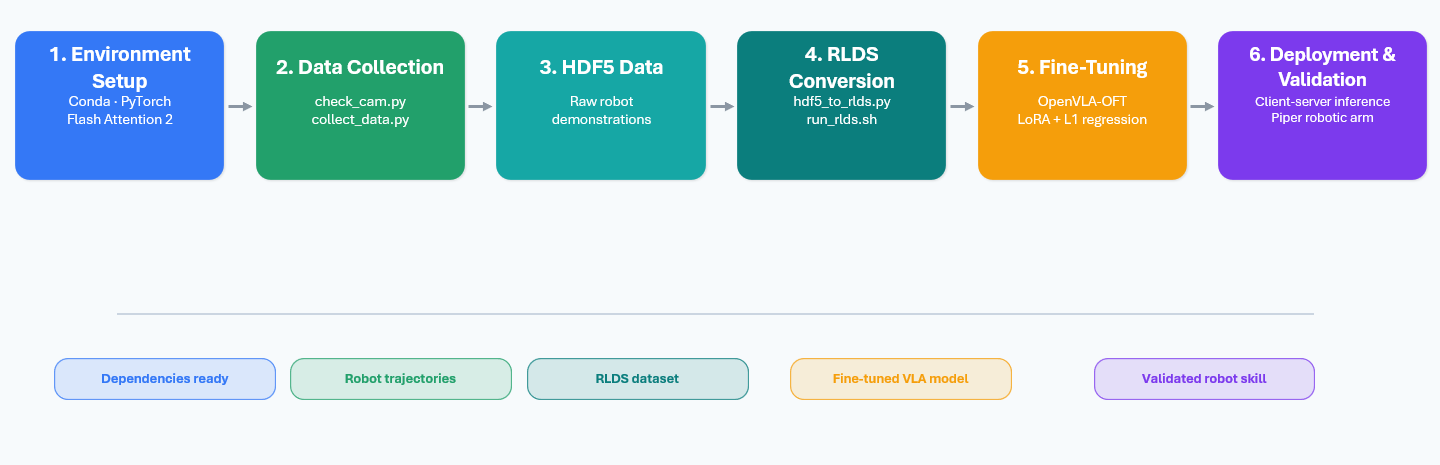
The local skill adaptation workflow is:
- Configure tasks, hardware, dataset paths and training parameters.
- Check the camera and robot connection.
- Collect local real-robot demonstrations.
- Save demonstrations as HDF5 episodes.
- Convert HDF5 episodes into RLDS datasets.
- Fine-tune OpenVLA-OFT with the converted dataset.
- Validate the checkpoint during server startup and inspect model outputs before physical execution.
- Deploy the model through the server-client architecture.
File Structure
Robonix-Skill-Toolkit/
├── robonix_config.py
├── configs/
│   └── experiments/
│       └── piper_multitasks.yaml
├── data/
│   ├── collect_data.py
│   └── hdf5_to_rlds.py
├── client/
│   ├── check_cam.py
│   └── robot_client_oft.py
├── scripts/
│   ├── can_activate.sh
│   └── find_all_can_port.sh
└── openvla-oft/
    ├── server_oft.py
    └── vla-scripts/
        └── finetune.py
Configuration
All task, hardware, dataset, training, server and client parameters are configured in:
configs/experiments/piper_multitasks.yaml
| Section | Description |
|---|---|
tasks |
Task IDs, language instructions, initial poses and task-level safety limits |
robot |
Piper CAN port, joint conversion constants and gripper parameters |
camera |
Camera ID, capture resolution and model input resolution |
dataset |
HDF5 root, RLDS root, dataset name, version and validation split |
collect |
Collection FPS and default task ID |
convert |
Multi-task merge strategy and filtering options |
train |
OpenVLA-OFT fine-tuning hyperparameters |
server |
Checkpoint path and HTTP server settings |
client |
Server URL, control frequency and action chunk execution |
Example task configuration:
tasks:
  - task_id: pick_banana
    instruction: "pick up the banana"
    init_pose: [0.547, 1.258, -1.552, 0.003, 1.315, -0.576, 1.0]
    max_steps: 120
    max_delta: 0.04
    execute_chunk_steps: 2
    enabled: true
Step 1: Environment Setup
Create and activate the conda environment:
conda create -n openvla-oft python=3.10 -y
conda activate openvla-oft
Install PyTorch according to the local CUDA version:
pip3 install torch torchvision torchaudio
Install OpenVLA-OFT dependencies:
cd openvla-oft
pip install -e .
Install Flash Attention 2 for training when the local GPU environment supports it:
pip install packaging ninja
ninja --version
pip install "flash-attn==2.5.5" --no-build-isolation
Step 2: Data Collection
The data collection module covers hardware checking, task-conditioned real-robot demonstration collection, HDF5 episode storage and data quality requirements. It is the first stage of local skill adaptation, and the collected data directly determines the quality of later fine-tuning.
2.1 Camera and Robot Check
Use client/check_cam.py to verify whether the camera can be opened and previewed:
python client/check_cam.py
For Piper, make sure the CAN interface is available before data collection or robot execution. Helper scripts are provided under scripts/.
2.2 Data Collection Script
data/collect_data.py is the main data collection script. It loads task definitions from the YAML config. During collection, the user selects a configured task, records a demonstration and saves the episode as success or failure.
python data/collect_data.py \
  --config_path configs/experiments/piper_multitasks.yaml
During collection:
- Select a task from the configured task list.
- Press
sto start recording. - Demonstrate the task in teaching mode.
- Press
yto save the episode as success. - Press
nto save the episode as failure. - Switch to another configured task when collecting multi-task data. (Task switching is only allowed when not recording.)
2.3 HDF5 Episode Format
Each episode is saved as one HDF5 file. The HDF5 schema is shared by single-task and multi-task data.
HDF5 field table:
| Field | Type | Shape | Description |
|---|---|---|---|
observations/images |
uint8 |
[T, 224, 224, 3] |
RGB observation images |
observations/state |
float32 |
[T, 7] |
6 joint states + gripper |
action |
float32 |
[T, 7] |
6 joint deltas + next gripper |
language_instruction |
str |
scalar | Task instruction |
task_id |
str |
scalar | Configured task ID |
reward |
float |
scalar | 1.0 for success, -1.0 for failure |
sim |
bool |
scalar | False for real-world data |
State format:
[joint_1, joint_2, joint_3, joint_4, joint_5, joint_6, gripper]
Action format:
[delta_joint_1, delta_joint_2, delta_joint_3, delta_joint_4, delta_joint_5, delta_joint_6, next_gripper]
2.4 Recommended Collection Criteria
| Item | Recommendation |
|---|---|
| Successful trajectories | At least 20 per simple task, 50+ for tasks with more variation |
| Failed trajectories | Optional, useful for filtering and debugging |
| Camera pose | Fixed during one collection session |
| Initial robot pose | Use configured init_pose per task |
| Language instruction | Must match the task instruction in config |
| Multi-task balance | Keep similar trajectory counts per task if possible |
2.5 Data Quality Metrics
| Metric | Expected Condition |
|---|---|
| Missing fields | 0 |
| NaN/Inf in state/action | 0 |
| Image shape | [T, 224, 224, 3] |
| State/action length mismatch | 0 |
| Too-short episodes | Should be filtered before fine-tuning |
| Zero-action ratio | Should be checked and reported |
Step 3: Data Conversion
data/hdf5_to_rlds.py converts saved HDF5 episodes into RLDS/TFDS datasets for OpenVLA-OFT fine-tuning.
python data/hdf5_to_rlds.py \
  --config_path configs/experiments/piper_multitasks.yaml
The conversion behavior is controlled by the dataset and convert sections in the config file.
| Config Field | Description |
|---|---|
dataset.name |
Output RLDS dataset name |
dataset.hdf5_root |
Root directory of collected HDF5 episodes |
dataset.rlds_root |
Output root directory for RLDS datasets |
dataset.exclude_fail |
Whether to exclude failed episodes |
dataset.validation_ratio |
Ratio used to split validation episodes |
convert.merge_tasks |
Merge all enabled tasks into one dataset if true |
convert.preserve_gripper_changes |
Keep gripper-change steps during low-motion filtering |
When convert.merge_tasks=true, all enabled tasks are merged into one RLDS dataset named by dataset.name. Each episode keeps its own task_id and language_instruction.
When convert.merge_tasks=false, each enabled task is converted into a separate RLDS dataset.
RLDS Step Schema
| Field | Type | Shape | Description |
|---|---|---|---|
observation/image |
uint8 |
[224, 224, 3] |
RGB image |
observation/state |
float32 |
[7] |
Robot state |
action |
float32 |
[7] |
Robot action |
reward |
float32 |
scalar | Terminal reward |
discount |
float32 |
scalar | RLDS discount |
is_first |
bool |
scalar | First step marker |
is_last |
bool |
scalar | Last step marker |
is_terminal |
bool |
scalar | Terminal marker |
language_instruction |
string |
scalar | Task instruction |
Data Example
Here is an example of dataset_statistics.json of datasets in RLDS format.
{
    "action":
    {"mean": [-4.684889063355513e-05, 0.0018815468065440655, -0.005818227306008339,
     0.0005891860346309841, 0.0059196725487709045, -0.00021760746312793344, 0.5048092603683472],
 "std": [0.01849505864083767, 0.04295733943581581, 0.02245117537677288,
  0.010312630794942379, 0.021517977118492126, 0.007021446246653795, 0.49997571110725403],
  "max": [0.09862855076789856, 0.17505651712417603, 0.13838714361190796,
  0.16306611895561218, 0.169960156083107, 0.05651378631591797, 1.0],
  "min": [-0.13224360346794128, -0.169907808303833, -0.16931438446044922,
  -0.0757472887635231, -0.10855948179960251, -0.14308208227157593, 0.0],
  "q01": [-0.06464594677090645, -0.11778496503829956, -0.10294377714395524,
  -0.03143058657646179, -0.04263914346694946, -0.023333258628845215, 0.0],
   "q99": [0.06227089822292339, 0.1293100583553317, 0.038070203065872284,
   0.044037799313664576, 0.09472043052315718, 0.016853941679000922, 1.0]},
   "proprio":
   {"mean": [0.19157855212688446, 0.8735357522964478, -0.7225562334060669,
   0.02684261091053486, 0.41170039772987366, -0.8020003437995911, 0.5114427804946899],
    "std": [0.2147376984357834, 0.7654772400856018, 0.42819467186927795,
    0.07230901718139648, 0.37241050601005554, 0.061794690787792206, 0.49987301230430603],
    "max": [0.5764299035072327, 2.0375845432281494, 0.0077667152509093285,
    0.2751336991786957, 1.3230293989181519, -0.5129871964454651, 1.0],
    "min": [-0.1765400469303131, -0.043563418090343475, -1.3302026987075806,
    -0.24099506437778473, -0.3140370845794678, -1.0806206464767456, 0.0],
    "q01": [-0.14411846935749054, -0.0038222710136324167, -1.2606513500213623,
    -0.20694369077682495, -0.10068978682160377, -0.9871463668346405, 0.0],
    "q99": [0.5081002712249756, 2.036607265472412, 0.00753982225432992,
    0.22860042661428662, 1.3032548427581787, -0.6741683483123779, 1.0]},
    "num_transitions": 3015, "num_trajectories": 20
}
Here is an example of dataset_info.json of datasets in RLDS format.
{
  "fileFormat": "tfrecord",
  "moduleName": "abc",
  "name": "pick_up_the_banana",
  "splits": [
    {
      "filepathTemplate": "{DATASET}-{SPLIT}.{FILEFORMAT}-{SHARD_X_OF_Y}",
      "name": "train",
      "numBytes": "631431835",
      "shardLengths": [
        "2",
        "3",
        "3",
        "2",
        "2",
        "3",
        "3",
        "2"
      ]
    }
  ],
  "version": "1.0.0"
}
Step 4: Fine-Tuning
The fine-tuning stage uses OpenVLA-OFT as the default policy backend. The input is the converted RLDS dataset, and the output is a fine-tuned checkpoint containing model weights, action head and dataset statistics.
Main fine-tuning script:
openvla-oft/vla-scripts/finetune.py
Run fine-tuning:
torchrun \
  --standalone \
  --nnodes=1 \
  --nproc-per-node=1 \
  openvla-oft/vla-scripts/finetune.py \
  --config_path configs/experiments/piper_multitasks.yaml
| Item | Description |
|---|---|
| Input | RLDS dataset generated by data/hdf5_to_rlds.py |
| Backend | OpenVLA-OFT |
| Fine-tuning method | LoRA |
| Output | Fine-tuned checkpoint, action head and dataset statistics |
| Deployment target | openvla-oft/server_oft.py |
Key training parameters are configured in the train section:
| Parameter | Default / Example | Description |
|---|---|---|
use_l1_regression |
true |
Use L1 regression action head |
use_diffusion |
false |
Disable diffusion action head by default |
num_images_in_input |
1 |
Use one RGB image as visual input |
use_proprio |
Config-dependent | Must match the collected dataset and model setup |
batch_size |
4 |
Per-device batch size |
learning_rate |
Config-dependent | Fine-tuning learning rate |
max_steps |
Config-dependent | Maximum training steps |
use_lora |
true |
Enable LoRA fine-tuning |
lora_rank |
32 |
LoRA rank |
The exact values should be kept consistent with configs/experiments/piper_multitasks.yaml.
The following plot shows training loss, L1 loss and action accuracy during fine-tuning.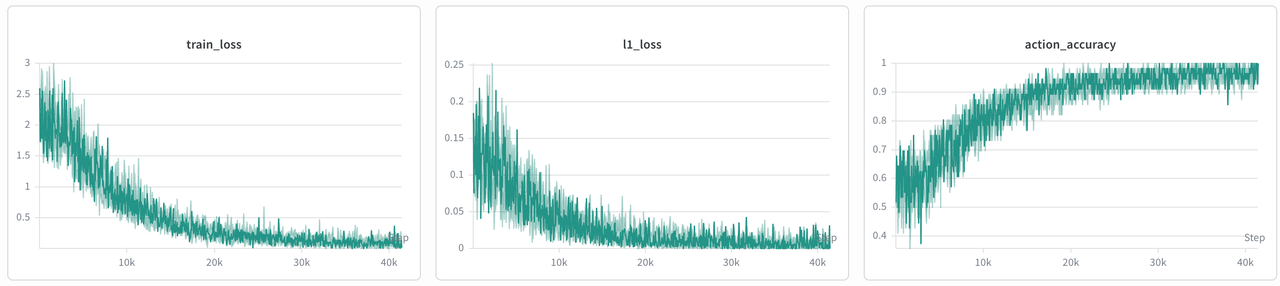
Step 5: Deployment
-
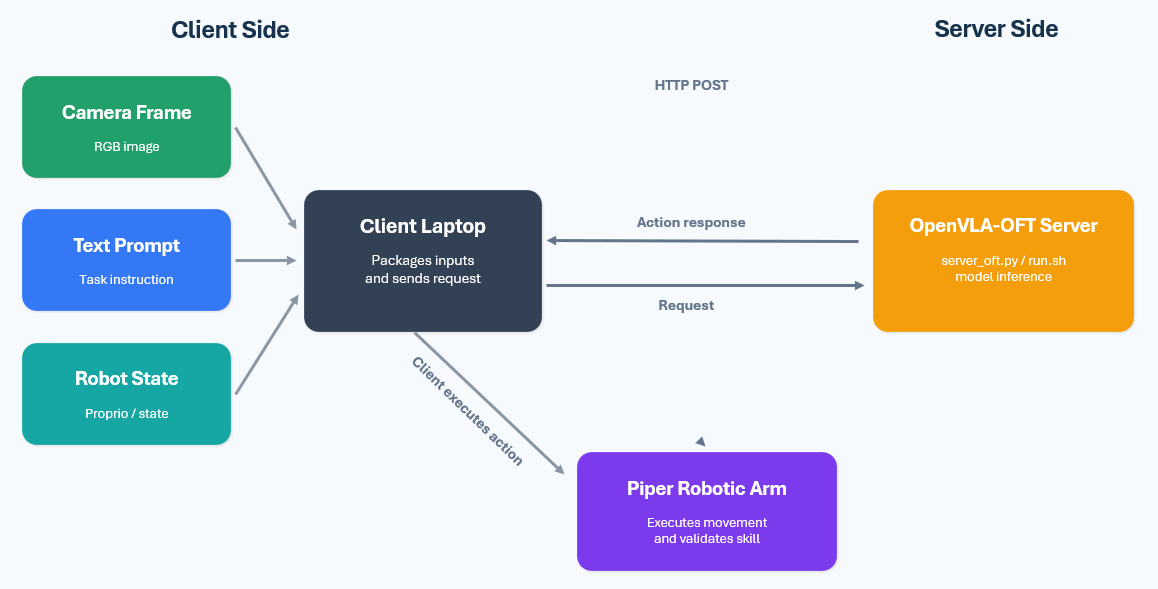
The Piper robotic arm acts as the client, while OpenVLA serves as the server. The two communicate over a local area network via the HTTP protocol.
-
Client side: Accesses the camera to capture frames, receives text prompts, packages images, prompts and robot states, and sends an HTTP POST request to the server.
-
Server side: Performs inference to compute robot actions and sends the action results back to the client.
-
In our setup, a Dell laptop running Ubuntu controls the robotic arm. Connect the two USB cables from the robotic arm and camera to the laptop.
-
Server code is stored in openvla-oft/server_oft.py. Once started, the server stays idle and waits for data and commands sent from the client.
Start the server:
python openvla-oft/server_oft.py \
  --config_path configs/experiments/piper_multitasks.yaml
Start the client:
python client/robot_client_oft.py \
  --config_path configs/experiments/piper_multitasks.yaml
Multi-Task Support
This repository extends the original single-task adaptation flow to configurable multi-task skill adaptation.
Multi-Task Data Layout
Recommended HDF5 data layout:
outputs/dataset_hdf5/
  pick_banana/
    ep_SUCCESS_001.hdf5
    ep_SUCCESS_002.hdf5
  put_banana_on_plate/
    ep_SUCCESS_001.hdf5
    ep_SUCCESS_002.hdf5
  push_red_block/
    ep_SUCCESS_001.hdf5
    ep_SUCCESS_002.hdf5
Each episode stores its own task_id and language_instruction. During conversion, the script checks whether the episode metadata matches the YAML task configuration.
Multi-Task Pipeline
| Stage | Multi-task Behavior |
|---|---|
| Config | Multiple tasks are defined in tasks |
| Collection | User selects one configured task per episode |
| HDF5 | Each episode stores task_id and language_instruction |
| Conversion | Tasks can be merged into one RLDS dataset or exported separately |
| Fine-tuning | OpenVLA-OFT trains on the converted dataset |
| Deployment | Client sends task_id and instruction to the server |
For early multi-task experiments, we recommend 2 to 3 tasks with similar workspaces and balanced trajectory counts.
Benchmark and Metrics
The benchmark section reports the evaluation protocol and metrics tracked by this toolkit. If measured physical results are unavailable, the following tables should be treated as reporting templates and replaced after real-robot evaluation.
Experimental Setup
Unless otherwise noted, the following default configuration is used: | Setting | Value | | --------------------- | ---------------------------- | | Base model | OpenVLA-7B | | Robot | AgileX Piper | | Camera | ORBBEC DABAI | | GPU | 1 × NVIDIA A100 80 GB | | Image input | 1 × RGB image, 224 × 224 | | Fine-tuning method | LoRA | | LoRA rank | 32 | | Batch size | 4 | | Gradient accumulation | 1 | | Learning rate | 5e-5 | | Gradient update steps | 30,000 | | Image augmentation | Enabled | | Proprioception | Enabled | | Action chunk length | Fixed for all experiments | | Evaluation trials | 3 seeds × 10 trials per task | | Main metric | Physical task success rate | | Average metric | Macro-average over tasks | | Default task | Pick up the banana |
Single-task and Multi-Task Performance
We trained a multi-task model capable of performing three tasks, as well as three single-task models, each designed to perform one of the tasks. The task performance comparison is shown below.
| Training setting | Checkpoints | Episodes per task | Total episodes | Total update steps | Pick Banana | Place on Plate | Push Red Block | Macro Avg. |
|---|---|---|---|---|---|---|---|---|
| Single-task models | 3 | 50 | 150 | 120,000 | 82.4 ± 2.9 | 76.7 ± 4.6 | 80.0 ± 2.1 | 80.0 |
| Multi-task model | 1 | 50 | 150 | 40,000 | 80.0 ± 3.3 | 74.5 ± 3.8 | 76.7 ± 4.7 | 76.7 |
Effect of Training Data Size
This tabel shows the effect of different training data size. | Episodes per task | Total episodes | Approx. transitions | Effective data passes | Multi-task success rate | 40k-step training time | | :---------------: | :------------: | :-----------------: | :-------------------: | :---------------------: | :--------------------: | | 10 | 30 | 4.5k | 35.6 | 61.1 ± 5.1 | 12.5 h | | 20 | 60 | 9.0k | 17.8 | 72.2 ± 4.4 | 12.6 h | | 50 | 150 | 22.5k | 7.1 | 86.7 ± 2.7 | 12.8 h | | 100 | 300 | 45.0k | 3.6 | 88.9 ± 2.2 | 13.0 h |
L1 Regression vs. Diffusion Action Head
There are several approaches to fine-tuning the model. The two methods we commonly use are L1 regression and a diffusion action head. Below, we compare the performance of these two fine-tuning approaches.
| Action head | Macro Avg. | Time per update | 40k-step time | Inference latency |
|---|---|---|---|---|
| L1 Regression | 76.7 ± 2.7 | 1.15 s | 12.8 h | 0.40 s |
| Diffusion | 78.9 ± 2.2 | 1.55 s | 17.2 h | 0.82 s |
Example Demonstration
We present an example to demonstrate the performance of Robonix-Sim2Real-Skill:
https://github.com/user-attachments/assets/daf14475-6878-4553-8284-d4ef6c2db285